Getting started
Turn on order alerts
Get a push alert on your phone the moment an order comes in, even with the dashboard closed.
Open this in your dashboard4 steps · Video
Push alerts on your phone tell you about new orders, Whish screenshots and failed deliveries straight away. Turn them on once on each phone or computer you use.
Watch the video
What the video says
- In this video, you turn on order alerts, so your phone buzzes the moment an order comes in.
- On iPhone, first add the dashboard to your Home Screen and open it from there.
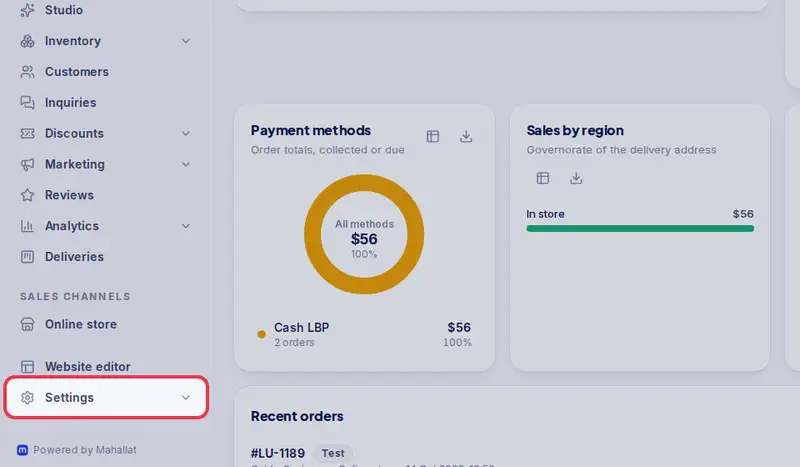
- Then open Settings, under More.
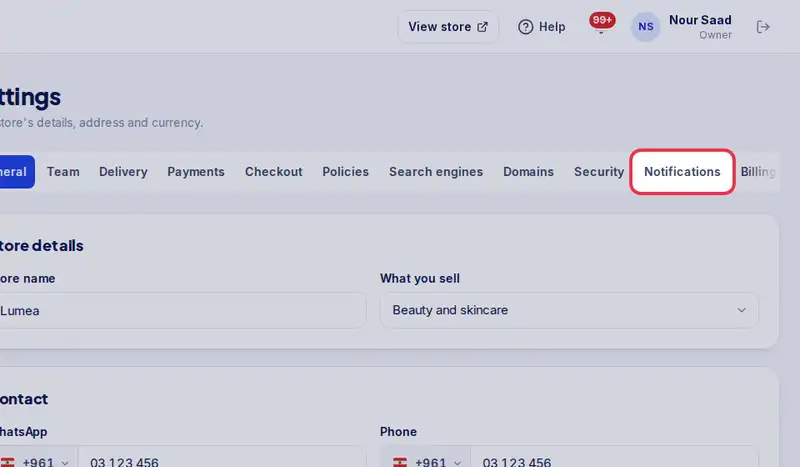
- Tap the Notifications tab.
- Turn on Get order alerts on this phone, then tap Allow when your phone asks.
- Tap Send me a test. A notification should arrive within a few seconds.
- Alerts tell you about new orders, Whish screenshots and failed deliveries, even with the dashboard closed.
Step by step
- Step 1: Open Settings.
- Step 2: Tap the Notifications tab.
- Step 3: Turn on Get order alerts on this phone, then tap Allow when your phone asks.
- Step 4: Tap Send me a test. A notification should arrive within a few seconds.