Getting started
Share your store link
Find your website address and send it to customers on WhatsApp and Instagram.
Open this in your dashboard5 steps · Video
Your store has its own web address. Send it everywhere your customers already are, so they can order without messaging you first.
Watch the video
What the video says
- In this video, you find your store's link and share it, so customers can order without messaging you first.
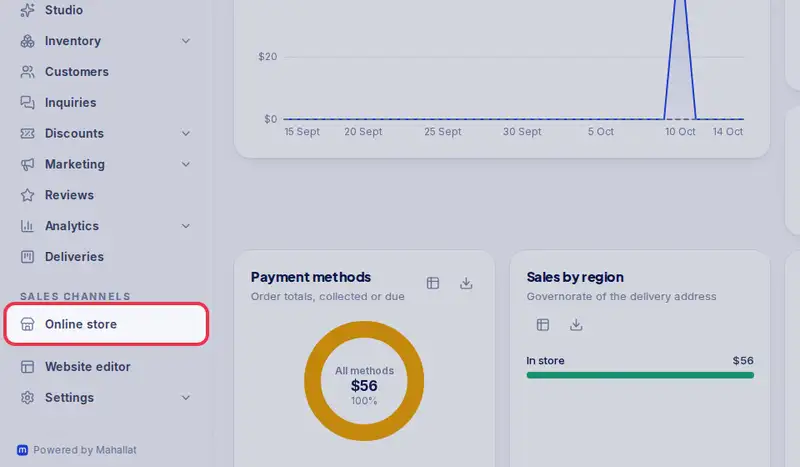
- Open Online store from the menu.
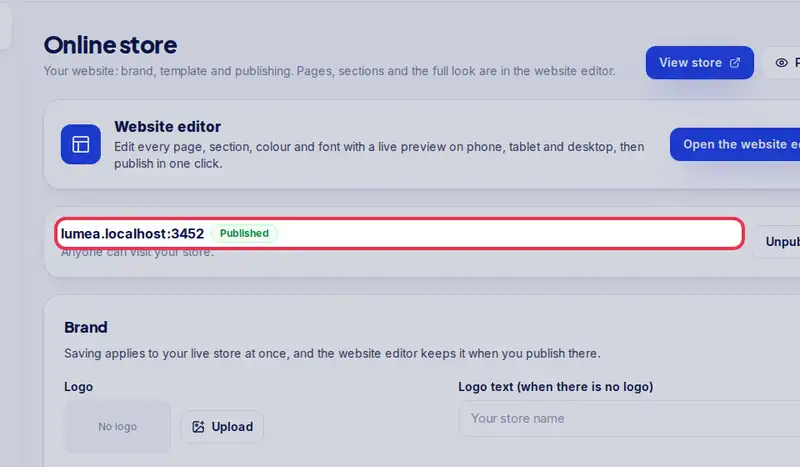
- Your link is here, next to Published. Press and hold it, or select it, to copy it.
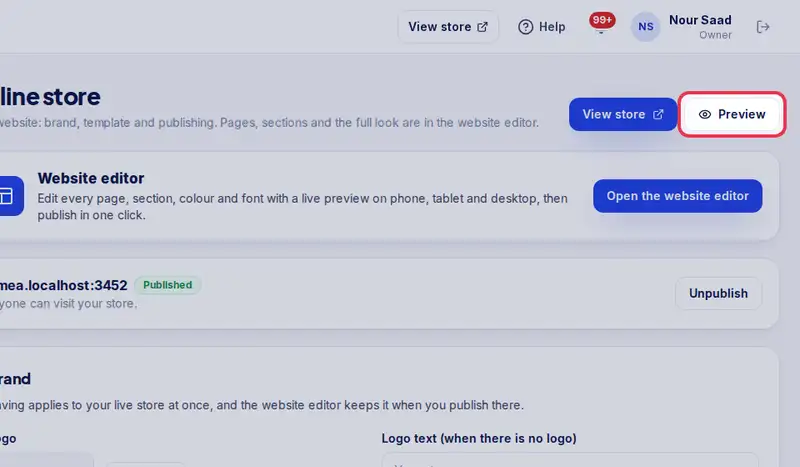
- Tap Preview to see your store exactly as a customer does.
- On WhatsApp, paste it in your status and under Website in your business profile.
- On Instagram, paste it in your bio under Links, and add a link sticker to your stories.
- Customers can open it once your store is published.
Step by step
- Step 1: Open Online store in the menu.
- Step 2: Your link is at the top, next to Published or Not published. Press and hold it (or select it) to copy it.
- Step 3: Tap Preview to see the store exactly as a customer does before you send it.
- Step 4: On WhatsApp: paste the link in your status, in your business profile under Website, and in replies when someone asks for prices.
- Step 5: On Instagram: paste it in your bio under Links, and add a link sticker to your stories.