Your website
Sell online or show a catalog
Choose how customers buy: an online shop with a cart and checkout, or a catalog where customers ask about each item.
Open this in your dashboard4 steps · Video
Some businesses sell online, others show what they have and take questions: real estate, cars, a restaurant menu or made-to-order work. Mahallat does both, and you can switch any time.
Watch the video
What the video says
- In this video, you switch your store between an online shop with a cart, and a catalog where customers ask about each item.
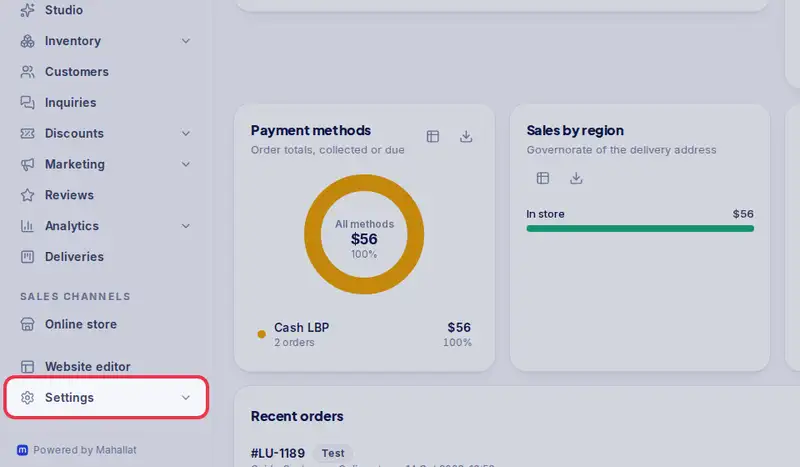
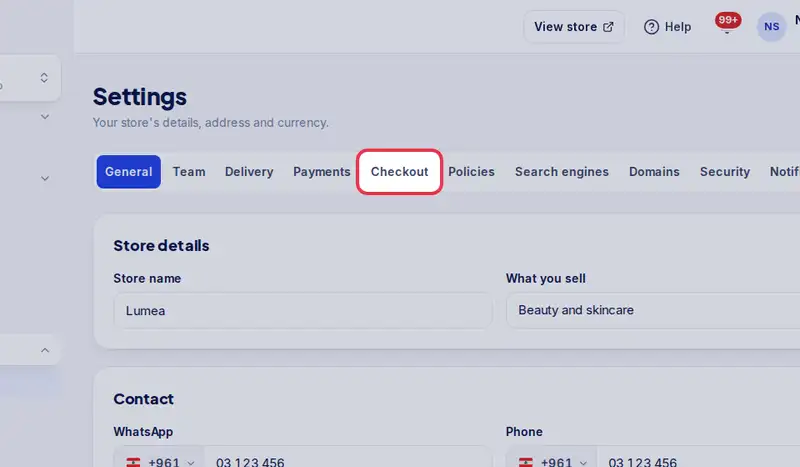
- Open Settings, then the Checkout tab.
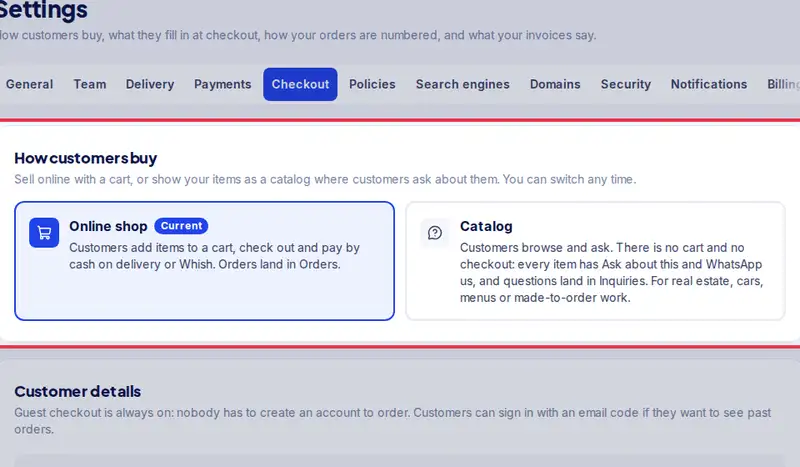
- Under How customers buy, tap Catalog.
- Read the note, then tap Switch to Catalog. Carts disappear and open checkouts close.
- Orders already placed stay in Orders, and you can still create orders for sales in your shop.
- Now every item shows Ask about this, and WhatsApp us. Questions land in Inquiries.
- To sell online again, tap Online shop. It switches back at once.
Step by step
- Step 1: Open Settings.
- Step 2: Tap the Checkout tab.
- Step 3: Under How customers buy, tap Online shop or Catalog.
- Step 4: When you switch to Catalog, read the note and tap Switch to Catalog. Customers' carts disappear and open checkouts close. Orders already placed stay in Orders, and you can still create orders for sales made in your shop.