Customers
Publish, hide and reply to reviews
Decide which customer reviews show on your store and answer them.
Open this in your dashboard6 steps · Video
Reviews come from customers who received their order. Good ones can publish by themselves; the rest wait here for you.
Watch the video
What the video says
- In this video, you decide which customer reviews show on your store, and answer them.
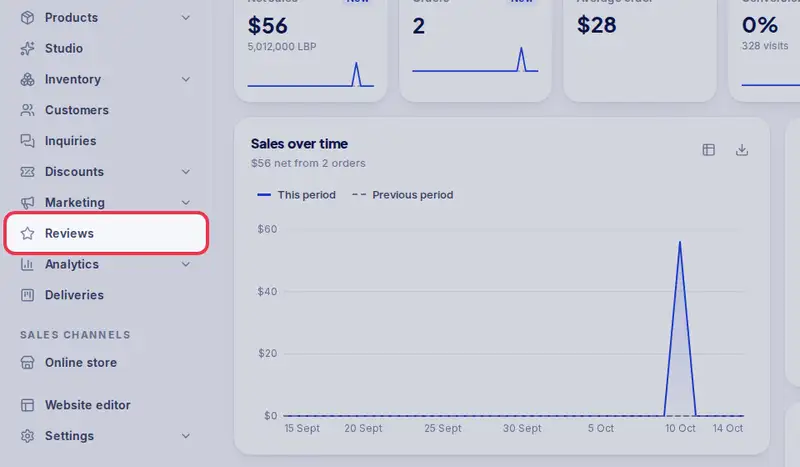
- Open Reviews from the menu.
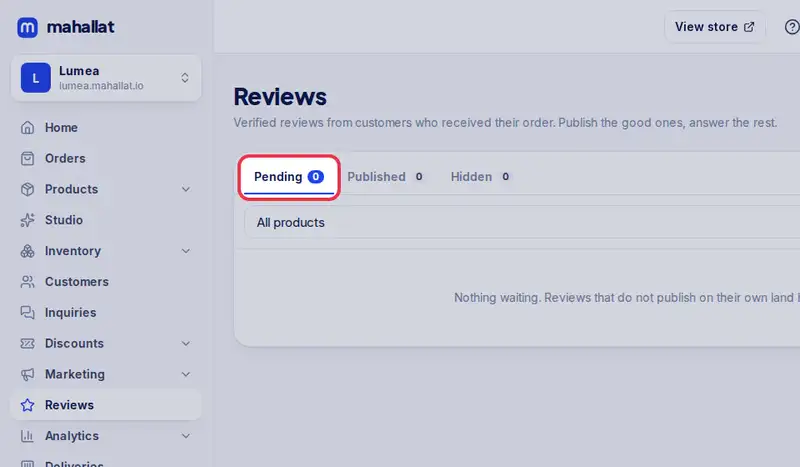
- Pending shows the reviews waiting for you.
- Tap Reply to answer a customer. Your reply shows under their review.
- Tap Save reply.
- Tap Publish to show it on your store.
- Spam, or not about your product? Tap Hide to keep it off your store.
- You can publish it later from Hidden. Published reviews show on the product page.
Step by step
- Step 1: Open Reviews in the menu.
- Step 2: Tap Pending to see the reviews waiting for you.
- Step 3: Tap Publish to show a review on your store.
- Step 4: Tap Hide to keep one off your store. You can publish it later from Hidden.
- Step 5: Tap Reply to answer. Your reply shows under the review.
- Step 6: Write your answer and tap Save reply.