Discounts and marketing
Win back abandoned carts
Send customers who left the checkout a link that puts their cart back, from your own WhatsApp in one tap.
Open this in your dashboard4 steps · Video
When a customer leaves the checkout after giving a phone or email, they show up here an hour later. Send them their cart back from your own WhatsApp in one tap.
Watch the video
What the video says
- In this video, you send a customer who left the checkout a link that puts their cart back, from your own WhatsApp.
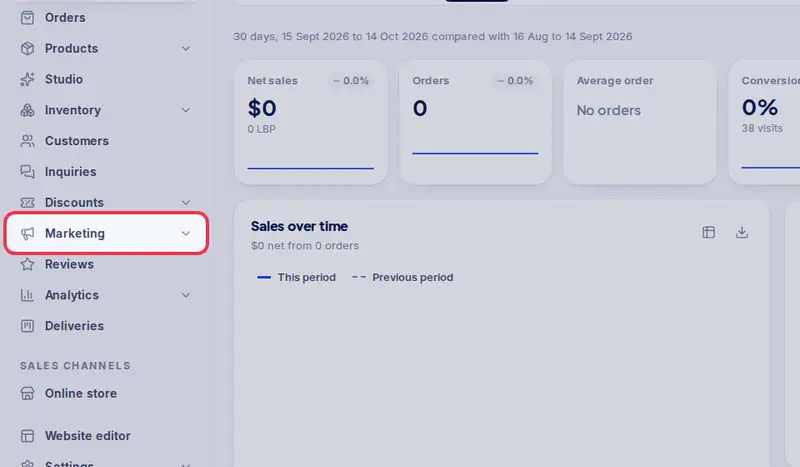
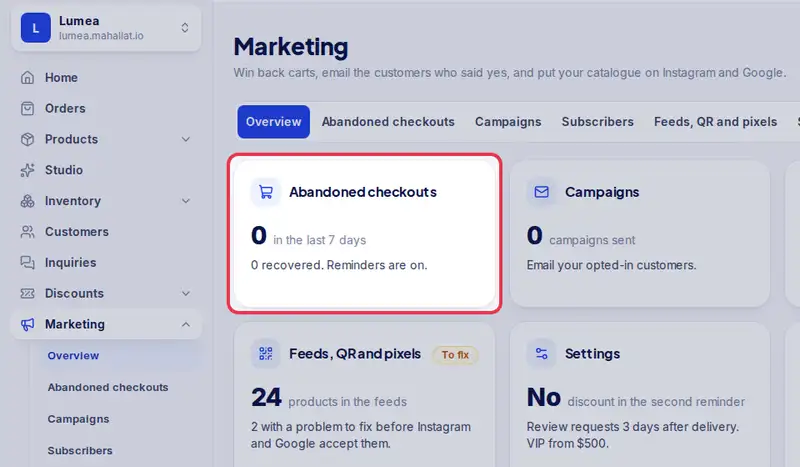
- Open Marketing from the menu, then Abandoned checkouts.
- Customers who left the checkout after giving a phone or an email show up here.
- Find the customer and tap Send WhatsApp now.
- WhatsApp opens with a ready message, their items and a link to their cart. You press send.
- Mahallat can also remind them by email on its own. Turn it on in Marketing, Settings.
Step by step
- Step 1: Open Marketing in the menu.
- Step 2: Tap Abandoned checkouts.
- Step 3: Find the customer and tap Send WhatsApp now.
- Step 4: WhatsApp opens with a ready-written message, their items and a link to their cart. Tap send: it goes from your own WhatsApp.