Orders and delivery
Confirm or update an order on WhatsApp
Send the customer a ready-written WhatsApp from your own phone: the confirmation, payment received, out for delivery and more.
Open this in your dashboard5 steps · Video
Customers get every order update by email on their own. When you want to talk to them on WhatsApp too, Mahallat writes the message for you and opens your own WhatsApp: you check it and press send. Mahallat never sends WhatsApp messages for you.
Watch the video
What the video says
- In this video, you send a customer a ready written WhatsApp message to confirm their order.
- Open the order from Orders.
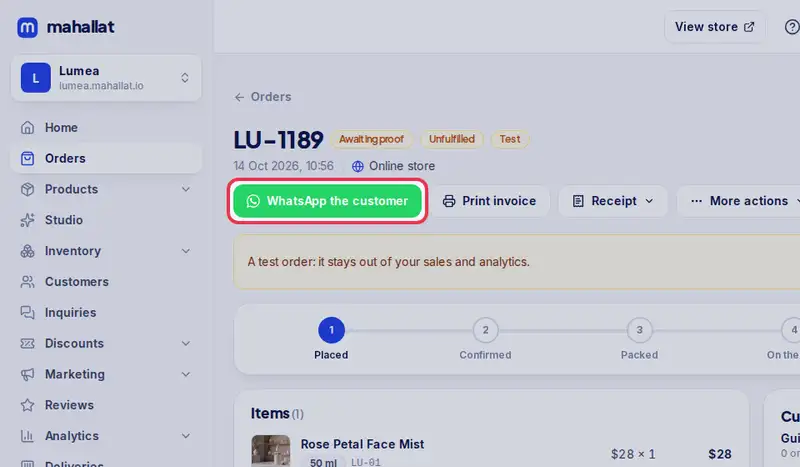
- Tap WhatsApp the customer.
- Pick the message, like Order confirmation. The text is ready for this order.
- You can change the text before you send it.
- Leave Also mark the order as confirmed ticked.
- Tap Open WhatsApp. Your WhatsApp opens with the message typed in: press send there.
- Mahallat never sends WhatsApp for you. The order notes that you opened it.
Step by step
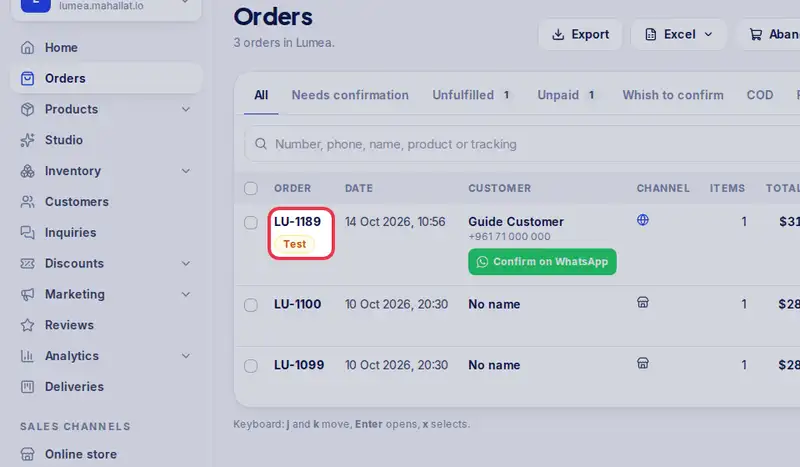
- Step 1: Open the order from Orders. A new order also has a Confirm on WhatsApp button right in the list.
- Step 2: Tap WhatsApp the customer.
- Step 3: Pick the message, for example Order confirmation, Payment received or Out for delivery. The text is ready for this order, and you can change it.
- Step 4: For a new order, leave Also mark the order as confirmed ticked.
- Step 5: Tap Open WhatsApp. Your WhatsApp opens on the chat with the customer, with the message typed in: press send there.