Settings
Who delivers your orders
Tell Mahallat if a delivery partner delivers your orders or you deliver them yourself, so your sales and profit count the delivery fees the right way.
Open this in your dashboard5 steps
Customers pay a delivery fee with their order. Who keeps that money depends on who delivers, and your numbers follow it.
Step by step
- Step 1: Open Settings.
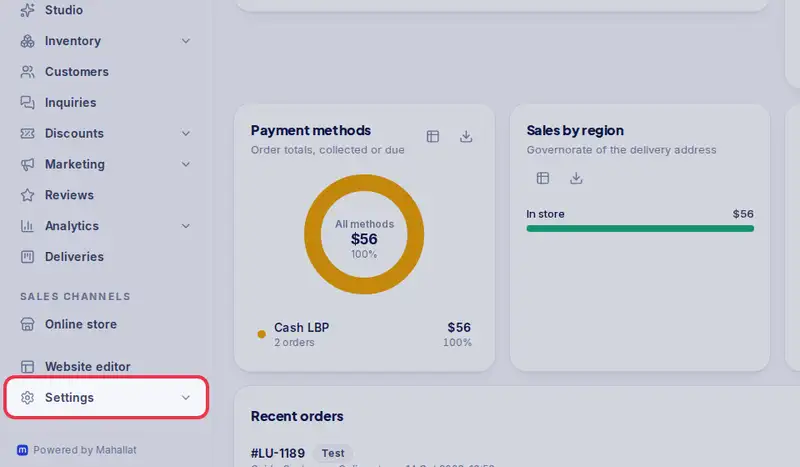
- Step 2: Tap the Delivery tab.
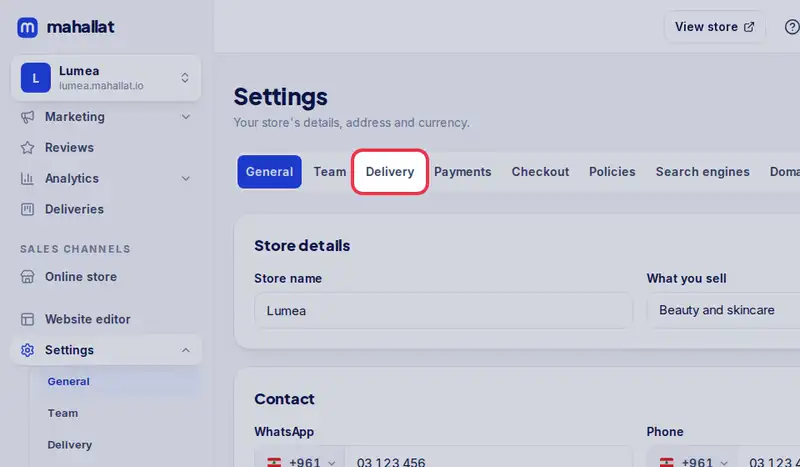
- Step 3: Under Who delivers your orders?, pick A delivery partner delivers them (Wakilni, Toters or a courier, the default) or We deliver them ourselves.
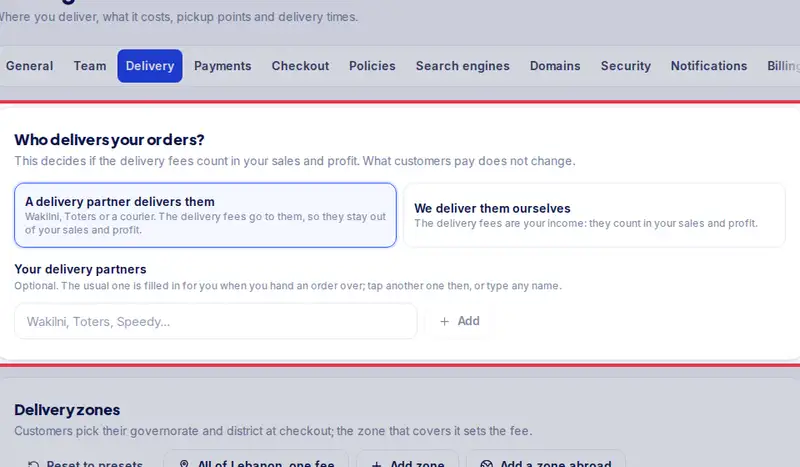
- Step 4: With a partner, add its name if you like: type it and tap Add. Work with more than one? Add each of them (up to 10), put them in your order with the arrows, and tap the star next to the one you use most: that is your usual partner. It is filled in for you when you pack an order or hand it over, and your other partners are one tap away there (or type any other name). When you deliver yourself, orders show "Delivered by us".
- Step 5: Tap Save delivery settings.